List of contents
Discover the AI powered personalisation tool
See a DemoHow to Solve the 10 Things Broken with eCommerce
Download GuideEcommerce Is Too Transactional — Here's What That Actually Means

List of contents
Walk into a well-run physical store and someone with real product knowledge has already made a hundred small decisions before you arrive. What's at eye level. What's grouped with what. Which jacket sits next to which pair of boots because they were photographed together and they're meant to be sold together. Most ecommerce sites make none of those decisions. They show you a warehouse: every SKU in a category, sorted by best-seller or newest, with a search bar to dig yourself out if you already know exactly what you want.
In short: ecommerce is too transactional when the browsing layer between "I arrived" and "I'm at checkout" gets reduced to a list. It isn't that ecommerce sites are bad at processing an order — most of them are excellent at that. It's that retail has never really worked as a flat list, and most sites still present one. Two examples make the gap obvious: how category pages get built, and whether a site helps a customer complete a look.
The category page as filing system
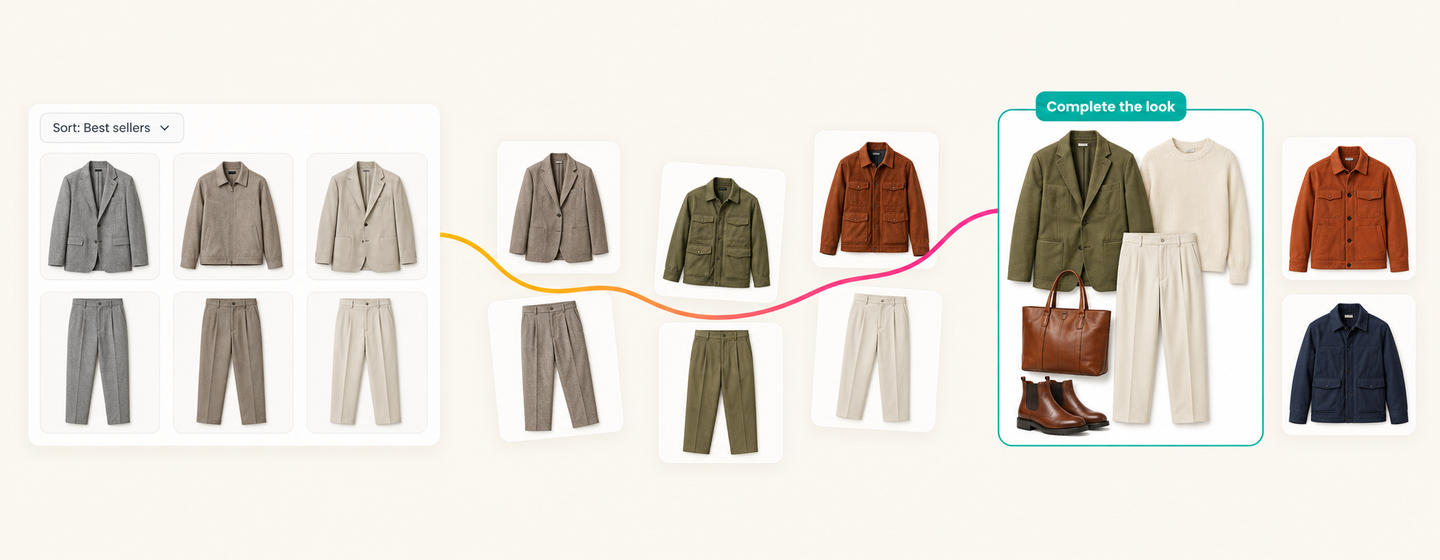
On paper, a category page is simple: show everything that fits, apply a sort. In practice, it carries almost none of the information that got the customer there. Someone who lands on "jackets" from a search for a specific waterproof shell wants something completely different from someone who clicked through from a styling post about a going-out look — and today, both of them see the same wall of products, in the same order, regardless of intent.
We've sat with retailers running thousands of visually similar SKUs inside a single category, watching customers scroll through the same undifferentiated list no matter what actually brought them to the page. The category page is treated as a filing system, not a conversation, and the fix isn't more products or better photography. It's presentation logic that reflects why the visitor is there.
The pairing that never makes it onto the page
Then there's the pairing problem: helping a shopper complete the look. Most retailers already know, structurally, that a jacket sells better next to the trousers it was styled with, or that a bottle of wine sells better next to the glassware it's meant to be drunk from. That knowledge rarely makes it onto the page as anything more than a "you may also like" strip bolted onto the bottom of a product page, generic, often irrelevant, and shown after the customer has already made their decision rather than while they're still forming it.
We've talked to fashion retailers who know exactly which pieces were designed and photographed together, and still can't get the site to present them as a set, because the tooling treats every product as an independent row in a database rather than part of a considered outfit. Retailers who do get this right consistently see basket value move when a shopper adds even one paired accessory to a core piece. That's not a marginal win. It's the commercial case for merchandising as a discipline, sitting there unclaimed because the site can present a list of products but not a relationship between two of them.
It shows up just as clearly on the product page. A shopper who has already decided on a jacket doesn't need to see ten more jackets, they need to see the two or three things that make the outfit work. Show them an unrelated "customers also bought" list instead, and you've answered a question they didn't ask while ignoring the one they did.
Same root cause, same fix
Both problems come from the same place. Ecommerce platforms were built to display and sell individual SKUs efficiently, not to tell the kind of story a good merchandiser tells on a shop floor. Category pages default to a single sort because a single sort is what the database can do without help. Cross-sell defaults to "other things people bought" because that's what the data can compute without anyone actually deciding what belongs together.
Fixing this isn't a content problem. It isn't solved by writing more copy or shooting more lifestyle imagery, though both help. It's a presentation problem, solved by logic that reflects two things at once: what the retailer already knows should be shown together, and what this specific customer is likely looking for. A category page that adapts to the intent behind the visit. A product page that presents a genuine pairing, not a generic recommendation slot. Products that were designed, priced or photographed as a set, deliberately kept together on the page, even while everything else around them sorts and personalises normally.
None of this means abandoning the transactional core of ecommerce — the cart, the checkout, the fulfilment all still need to work exactly as they do. It means giving the browsing layer the same seriousness retail has always given the shop floor: a set of deliberate decisions about what goes next to what, made for the person actually looking, rather than left to a default sort because nobody built the tooling to do better. That's what Shopbox's Merchandising Studio is built to do alongside personalised search and recommendations — see the full AI Commerce Layer, or book a demo against your own category pages.
Frequently asked questions
Why is ecommerce too transactional?
Because the browsing layer between arriving on a site and checking out is usually reduced to a single sorted list, regardless of who's looking or why they're there. Ecommerce platforms are built to sell individual SKUs efficiently, not to make the kind of presentation decisions a good merchandiser makes on a shop floor.
What is a personalised category page?
A category page that adapts its order and grouping to the intent behind the visit, so a shopper who arrived from a specific search sees something different from one who arrived from a styling post, rather than everyone seeing the same default sort.
What does "complete the look" mean in ecommerce?
It's presenting products that were designed, styled or photographed together as a genuine set on the page, rather than a generic "you may also like" strip that treats every product as an unrelated row in a database.
Why don't category pages adapt to shopper intent by default?
Because most sorting logic only has one lever, a single sort applied to everyone, and most cross-sell logic only computes "other things people bought," which is what the underlying data can produce without anyone deciding what actually belongs together.
How is a merchandised category page different from a filtered list?
A filtered list narrows a warehouse of products by attribute. A merchandised category page reflects deliberate decisions about what goes next to what, for the person actually looking, the way a real merchandiser would set a physical shop floor.
Share:


.png)
.png)