List of contents
Discover the AI powered personalisation tool
See a DemoHow to Solve the 10 Things Broken with eCommerce
Download GuideHow to Choose AI Site Search for Your Online Store (And What to Check Before You Switch)

List of contents
Here's how most shoppers buy now. They do the thinking somewhere else. They ask ChatGPT which cordless drill to get for a first home, or what to wear to an autumn wedding. They compare brands and read the reviews. By the time they land on your site, they know what they want.
Then they type it into your search bar. "18v combi drill" or "green midi dress size 12". And this is where a lot of retailers lose them: the wrong product, an out-of-stock line, or nothing at all.
Your search bar is the one place a shopper tells you exactly what they want. If you're weighing up search tools, or wondering whether the one you have is good enough, this is what to look for, whatever you sell. In short: search should just work, it should be fast, and it should know who's asking.
1. Search should just work
Good search shouldn't need a babysitter. Yet most standard search engines do. Someone on your team keeps a list of synonyms, so "trainers" finds "sneakers" and "jumper" finds "knitwear". They add fixes for misspellings like "cardigen" and "chellsea boots". Every new season brings new words to add.
Every category has its own language, and shoppers search in theirs, not your catalogue's:
- Occasions and uses: "wedding guest", "gift for a 5 year old", "furniture for a small balcony"
- Attributes stacked together: "black wide leg trousers petite", "white gloss paint 2.5 litre"
- Trade terms, slang and new words: "2 by 4" for timber, "sliders" for sandals, product names that didn't exist last season
Shopbox runs on an AI engine that understands what shoppers mean, so the synonym lists and spelling fixes aren't needed. Retailers see a 90% reduction in the manual work search needs, and some customers have never had to do any manual tuning at all. Your team's time goes on the range, not on the rules.
2. Why you can't just bolt gen AI onto search
The obvious fix for search that doesn't understand people is generative AI. It understands nearly anything you type. The problem is time.
Shoppers expect results as they type. A generative answer takes seconds to arrive, and in search, seconds feel like forever. Gen AI adds a lot to search, but in most cases it also adds a lot of waiting. Bolt it on the standard way and you trade relevance for speed, and conversion drops.
Shopbox has worked out how to optimise gen AI for search, so you get the understanding without the wait. Results come back in 150 milliseconds at P95 (95% of searches are faster than that), and that includes the AI. Shoppers never notice it's there. They just find what they wanted.
3. Why a chatbot isn't the fix
Many search vendors know gen AI is too slow for the search bar, so they add a shopping chatbot alongside it instead. On paper it makes sense: let the AI talk shoppers through it.
In practice, shoppers don't use on-site chat to buy. We tracked it with one retailer. Over six weeks, 13 orders started with a product found through chat. Over 4,000 started with a simple product recommendation.
That matches what we see everywhere. The deep research happens in ChatGPT and similar tools, before the shopper arrives. Once they're on your site, they're at the bottom of the funnel. They don't want a conversation. They want the right product, now. The answer isn't a chatbot next to search. It's search that's as smart as the chatbot and as fast as search.
4. Merchandise search like you merchandise categories
Retail teams micromanage their category pages. Which product leads the new-in page, which brand sits in the first row, what gets pushed when stock needs clearing. Then they hope for the best with search.
That's not good enough. A search results page is just a category page the shopper typed. Someone searching "garden hose" or "denim jacket" deserves the same thought as someone browsing that collection.
Shopbox spots where merchandising can be applied to search results, then works towards your goals:
- Push higher-margin lines
- Launch new ranges and new season stock
- Promote specific brands, including your own label
- Clear stock you need to move
Relevance comes first, so shoppers still see what they asked for. Your priorities decide the order.
5. Same search, different shopper
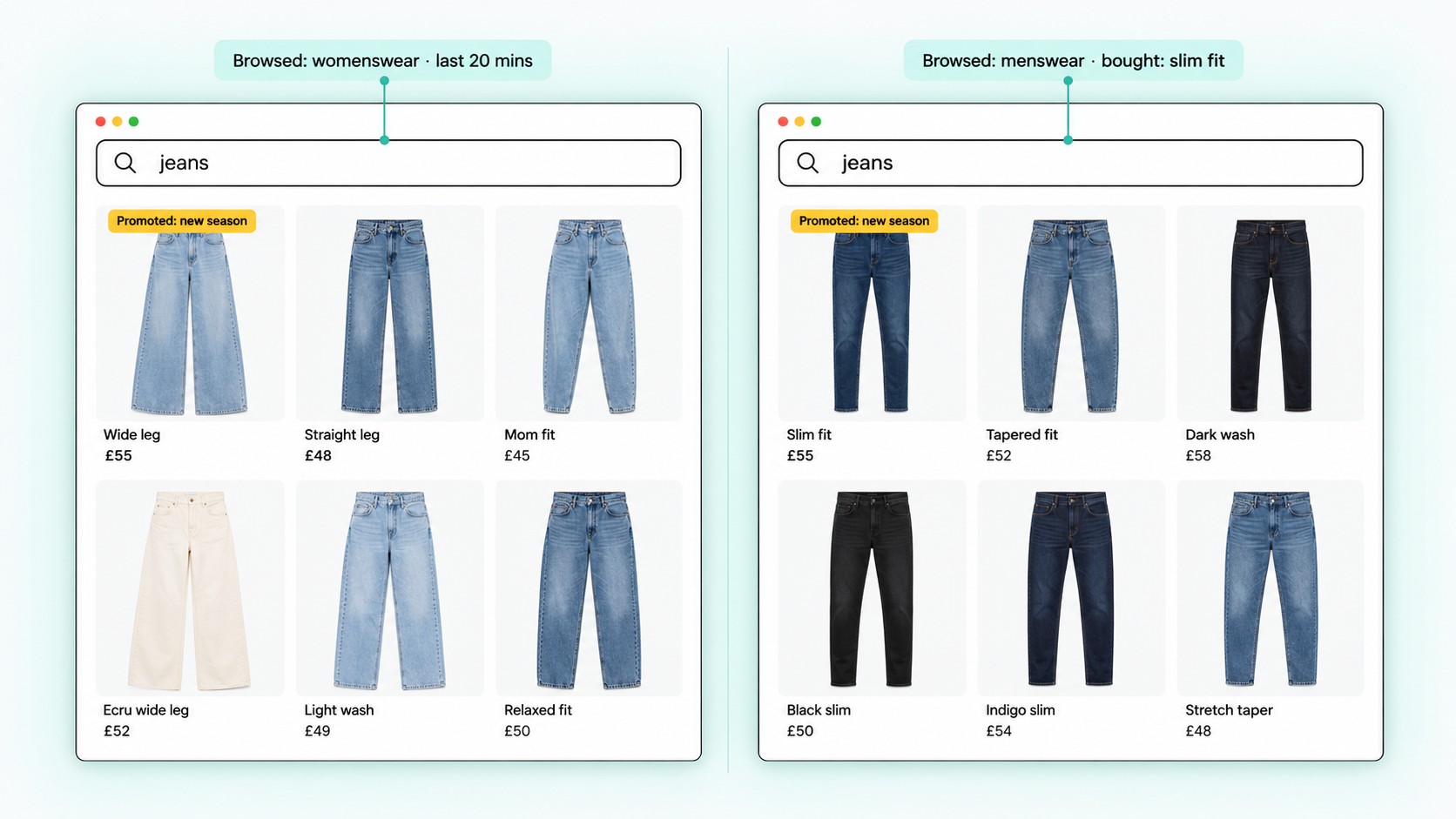
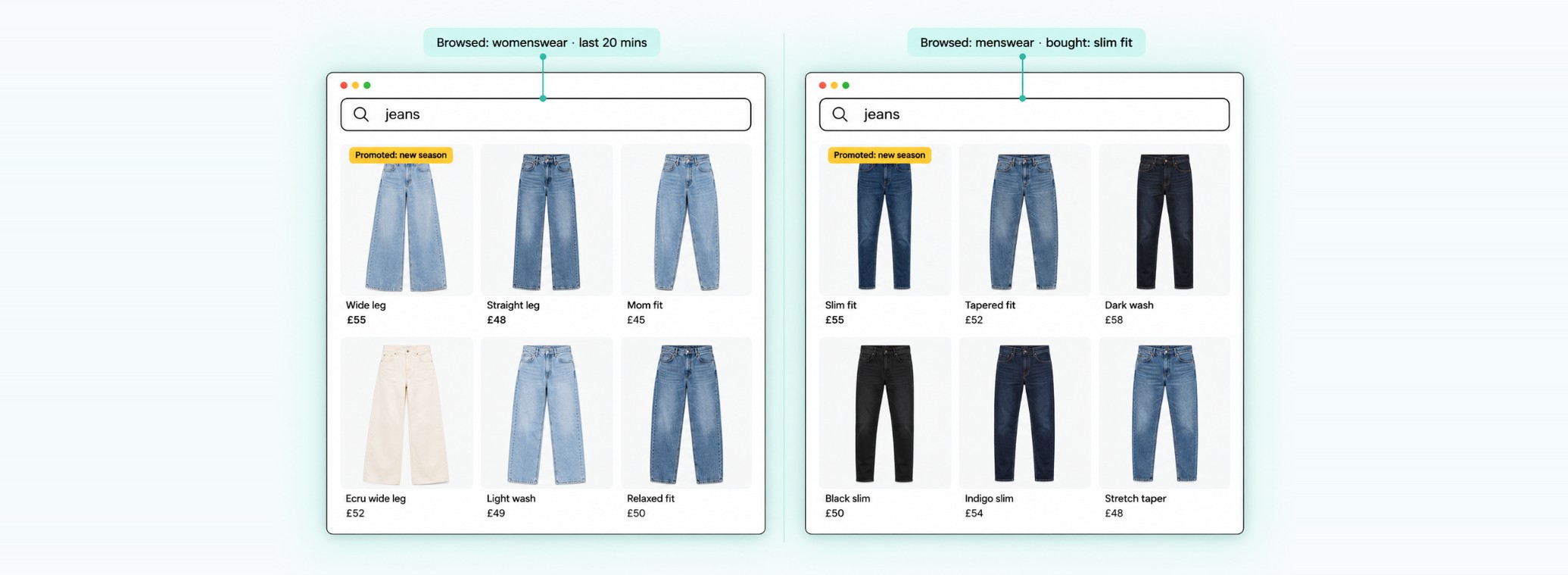
This is where almost every search tool falls down. Every shopper who types the same words gets exactly the same results.
Picture someone who has spent the morning in your womenswear section. They type "jeans". There's a fair chance they want women's jeans. Or a shopper who has been browsing outdoor lighting types "bulbs": they probably want outdoor bulbs, not the full range. Most search tools only see the word in the box and leave the shopper to sort it out.
Shopbox reads the context: what the shopper has browsed, what they've clicked and what they've bought before. It then adapts the results to that person. Two shoppers, same search, two different sets of results, and each one closer to what that person actually wants.
What it adds up to
Put those pieces together and you get four outcomes, each one you can measure:
- Less work: no synonym lists, no spelling rules, no seasonal clean-ups. 90% reduction in manual work.
- More accurate results: shoppers find the right product, in stock, in their size. Fewer zero-result and dead-end searches.
- Super fast: AI understanding without the wait. 150ms at P95, AI included.
- Better customer experience: results that fit the shopper and your goals. 5% increase in sales from search.
How to test a search tool before you switch
If you're looking at alternatives to your current search, don't judge on a demo store. Test on your own catalogue and your own queries.
- Run your top 50 searches. Pull them from your analytics and check the first row of results for each.
- Run your zero-result searches. These are the ones your current tool fails on, and they show you what you're losing today.
- Try real-world queries. Stack attributes ("black midi dress size 12", "outdoor LED wall light") and use occasions or uses ("wedding guest", "gift for dad"). Check that out-of-stock products and sizes don't show up.
- Time it. Type quickly and see whether results keep up. Ask for P95 response times, not averages.
- Ask what you'll have to maintain. Synonym lists, redirect rules and spelling fixes are all ongoing work.
- Check go-live. On Shopify, Shopbox sets up on a copy of your store so you can review it before anything changes, and you can be live the same day. On Adobe Commerce (Magento), BigCommerce, Salesforce Commerce Cloud, WooCommerce and custom platforms, go-live takes a sprint.
- Agree how you'll measure it. Conversion from search, revenue per search and zero-result rate, compared before and after.
FAQ
What is the best AI site search for a Shopify store?
Look for search that understands how your shoppers talk (occasions, stacked attributes, trade terms and new words) without manual synonym lists. It should also return results in well under a second, merchandise results to your goals, and adapt to each shopper. Shopbox AI does all four across fashion, footwear, home, DIY, toys and more, and can go live on Shopify the same day.
What should I look for in an alternative to my current ecommerce search?
Test it on your own top searches and zero-result searches. Then check response times at P95, how much manual upkeep it needs, and whether you can review it on a copy of your store before going live.
Does adding generative AI make site search slower?
Usually, yes. A generative answer takes seconds, and search needs results as the shopper types. Shopbox optimises gen AI for search and returns results in 150ms at P95, AI included.
Do shoppers use AI chatbots to find products?
Very rarely. In one six-week period at a Shopbox retailer, 13 orders started from chat compared with over 4,000 from a simple product recommendation. Shoppers do their research elsewhere and use search when they're ready to buy.
Does Shopbox only work on Shopify?
No. Shopify is the fastest to set up, but Shopbox also works on Adobe Commerce (Magento), BigCommerce, Salesforce Commerce Cloud, WooCommerce and custom platforms.
Share:


.png)